
Day 1: Single Servers, Load Balancers, Why My Flutter Apps Had SEO Issues, And More
As decided, I’ll invest the first 3 days in reading and learning about system design and then start building the HuntKit, or otherwise, I am not building the old way, which isn’t the goal
Day 1 done.
Spent my hour deep in Chapter 1 of Alex Xu’s book.
Here’s what clicked for me today:
Contents
It was fun, now I can actually understand what was missing in my previous projects.
Not just that, I got to learn how what I used works behind the scenes.
Maybe this is what connecting the dots looks like. I got to connect what I built before with this really well.
That made me learn something more than what the book had to offer(the serverless and cross-platform thing I got because of my prior building experience).
Further, the explanation will be a little bit textbook-like like but bear with me. It’s truly a bunch of amazing concepts.
1. How Single Server Setup Works?
A single server setup is where everything runs on one machine—your web application, database, cache, and all business logic.
When users access your website through a domain name, DNS returns the server’s IP address, and their HTTP requests go directly to that single server, which then sends back HTML pages or JSON responses.
This is the simplest way to start, but it has serious limitations:
- If that one server goes down, your entire application goes offline.
- There’s no redundancy or failover mechanism.
2. What Is A Serverless Architecture Behind the Scenes?
“Serverless” doesn’t mean there are no servers—it means you don’t manage them.
With serverless platforms like Firebase, the cloud provider (Google) handles all infrastructure decisions completely out of your hands.
Firebase runs on a multi-server, distributed system across multiple availability zones, not a single server. (All of the below answers and everything we will learn next)
When your app makes requests, Firebase automatically routes traffic across multiple servers globally, scales instantly based on demand, and handles failover if any server fails.
You just write code and deploy—Google manages scaling, load balancing, and redundancy automatically.
3. What Does Cross-Platform Really Mean?
The core distinction isn’t about mobile versus web—it’s about architecture patterns.
Mobile apps almost always use an API-based architecture where the frontend communicates with a backend API via JSON over HTTP.
Web apps can be built in two ways:
- server-side rendering (SSR), where the backend generates complete HTML pages, or
- API-based (like mobile), where the frontend fetches JSON data from a backend API.
Frameworks like Flutter and React Native follow the API approach—they need a separate backend that serves JSON responses.
One API can serve web, mobile, and desktop apps simultaneously.
4. Why Is Cross-Platform Still Bad On Web-Mobile Integration?
Flutter web apps compile to JavaScript and render everything client-side, which creates significant SEO challenges.
Search engine crawlers struggle to index content that requires JavaScript execution to render, making Flutter web poorly suited for public-facing websites needing search visibility.
Flutter excels at mobile cross-platform development (iOS + Android), but web remains problematic because there’s no native server-side rendering support, large bundle sizes slow initial loads, and performance isn’t as smooth as native web experiences.
The industry considers “cross-platform” for Flutter and React Native to mean mobile-only.
When teams need web plus mobile, they typically build mobile apps with Flutter/React Native and create a separate web version using Next.js or traditional SSR frameworks, sharing the same API backend.
5. SQL vs NoSQL (Briefly)
SQL databases (MySQL, PostgreSQL) are reliable and structured, ideal for transactional systems like ERP and authentication.
NoSQL databases (MongoDB, Firebase) offer low latency and flexibility, perfect for real-time apps like collaborative whiteboards or chat applications.
Most modern applications use both types depending on specific use cases—SQL for auth and security, NoSQL for real-time features.
This hybrid approach is called polyglot persistence.
6. What Is Vertical Scaling?
Vertical scaling (or “scaling up”) means adding more power: CPU, RAM, disk space—to your existing server.
It’s simple to implement when traffic is low, but it has serious limitations.
You hit a hard limit eventually because you can’t add unlimited resources to a single machine.
It’s also expensive at high capacity, and there’s no failover: if your server goes down, your entire website goes down with it.
7. What Is Horizontal Scaling?
Horizontal scaling (or “scaling out”) means adding more servers to your pool of resources instead of making one server more powerful.
This is far more desirable for large-scale applications.
With horizontal scaling, you get better reliability and virtually unlimited growth potential. If one server fails, others continue serving traffic.
You can keep adding servers as your user base grows without hitting the hard limits of vertical scaling.
Load Balancing
When you have multiple web servers from horizontal scaling, you need a load balancer to distribute incoming traffic evenly among them.
Users connect to the load balancer’s public IP address (obtained from DNS), and the load balancer routes requests to healthy, available servers using private IPs for security.
If one server goes offline, all traffic automatically routes to the remaining servers—no downtime.
If traffic grows rapidly, you just add more servers to the pool, and the load balancer automatically starts sending requests to them.
Database Replication (Master-Slave Approach)
Database replication addresses failover and redundancy issues for your data tier.
The master-slave model is the most common approach:
- The master database handles all write operations (INSERT, UPDATE, DELETE), while
- slave databases receive copies of data from the master and handle only read operations.
Since most applications have a read-heavy workload (typically 80-90% reads), you can have multiple slave databases distributing the read load.
This improves performance significantly because more queries can be processed in parallel. It also provides reliability: if one database goes down, your data is still preserved across other locations.
How Does The Architecture Overall Looks Once All Of This Is Done?
Here’s how it looks:
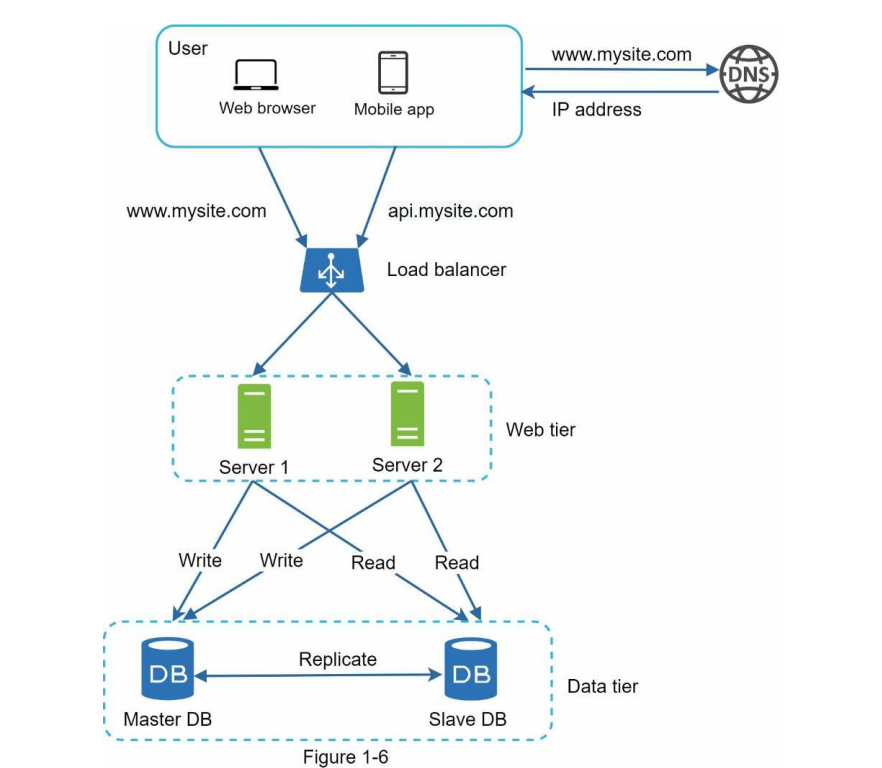
Image Credit: Book System Design Interview by Alex Xu
Users get the load balancer’s IP from DNS, connect to it, and the load balancer routes HTTP requests to available web servers.
Web servers read data from slave databases and route data-modifying operations to the master database.
This separation of the web tier and the data tier allows them to scale independently.
Next Up
We’re still doing redundant operations: fetching the same data from databases repeatedly when it doesn’t change often.
The next topic is caching (using Redis or Memcached) to store frequently accessed data in memory and reduce database load.
We’ll also explore CDN (Content Delivery Network) for distributing static assets like images, CSS, and JavaScript files across global edge servers closer to users, reducing latency.
Tomorrow: Day 2 of reading. By Day 4, I’ll start planning HuntKit’s architecture using these exact concepts—load balancing, database replication, and all.


Interesting to hear about the SEO issues with Flutter apps. Looking forward to seeing how your system design learning impacts the HuntKit build.
Glad you found it useful! I’m excited to apply system design to HuntKit and improve how I build and scale projects.